English
 Deutsch
 Français
 Español

Video Wall Management & KVM Operations Made Simple
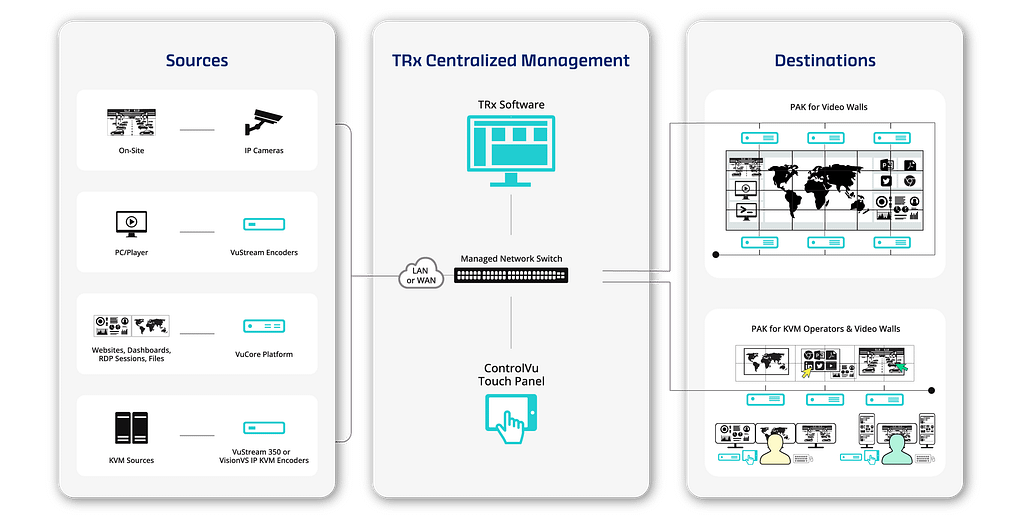
TRx is unique in combining advanced multi-video wall management, KVM operations and AV distribution in a single platform. TRx is used to configure, manage and distribute virtually any source type to any display with an easy drag-and-drop and no programming.

Centralized Management
Configure and control all video walls, displays, and KVM workstations from a single platform.

Secure & Reliable
Runs in a lightweight, containerized, closed environment for stable and controlled operations.

Ease of Use
Easy drag-and-drop interface for configuration and operations.

Flexible & Scalable
Unlimited number of sources & destinations. Modular design that adapts to evolving needs.

Interoperable
Support for major AV and KVM platforms including G&D.

24/7 Availability
Full availability & control of your visualization infrastructure.

Access from Anywhere
Web-based management.
No software installation required.

VMS Plugins
Integration with Genetec Security Center and Milestone XProtect.
Workflow
VuCore Platform
VuCore is the secure platform that hosts and manages TRx, providing a centralized foundation for VuWall’s ecosystem of visualization, control, and operational services. It simplifies deployment, strengthens system reliability, and supports scalable AV, video wall, and KVM workflows in mission-critical environments.

Touch Panel Control
Give operators the freedom to change layouts and control devices with a simple touch. Create fully customized panels quickly and easily without any programming skills.
IP KVM Technology
Share access to critical information between personal workstations, local displays, and the main control room video wall. Boost productivity and make faster decisions with PAK KVM capabilities.

SOC 2 Certification
We don’t compromise on security, especially when it comes to control rooms. The TRx management platform is fully SOC 2 Type II compliant. Our commitment to top-tier information security practices, policies, procedures, and operations has been independently audited and validated.
Security
VuWall is dedicated to maintaining the highest level of security for the company, its products, and services. With SOC 2 certification, TAA compliance, NDAA compliance, ISO 9001, AES encrypted video streams, and user rights management, VuWall delivers peace of mind.


High-Performance G&D KVM Integrations
TRx provides native support for G&D systems, enabling centralized control of KVM sources and destinations directly within the TRx workflow. Through integration with G&D ControlCenter matrices and PersonalWorkplace-Controller, TRx helps operators manage AV, video wall, and KVM resources from a unified interface, simplifying operations across VuWall and G&D environments.
Industries That Rely on TRx

Federal/Defense
Intelligent & Secure

Transportation
Content Management for Modern Transportation

State & Local
Multi-source Collaboration for Agencies

Security
Multi-source & multi-screen visualization with VMS integration

Data Centers,
IT & Telecom
Multi-Source Visualization and Collaboration

Utilities
24/7 reliability for secure & effective operations
Advanced TRx Features
Web-Based Management Interface
Access the TRx interface from any web browser, no client software required. Simplifying deployment, maintenance, and remote management.
VMS Plugins for Genetec and Milestone
Integrate with Genetec Security Center and Milestone XProtect via dedicated plugins. Control TRx directly from VMS interfaces with automatic camera import and user-based system hierarchy.
User Rights Management
Control access with role-based permissions and optional Active Directory integration. Define user rights for sources, destinations, presets, control panels, scripting, and system functions.
Routing & Monitoring Interface
Route sources to destinations with drag-and-drop controls, advanced filtering, and real-time video previews for fast, accurate operation.
Video Wall & KVM Display Management
Manage content on video walls and KVM workstations through an intuitive interface. Easily position, resize, and scale source windows for flexible layouts and efficient visualization.
Layouts & Presets Management
Create and save layouts with predefined source positions and display arrangements for quick deployment. Instantly restore video wall configurations, workstation layouts, and routing states with presets.
Video Stream Transformations
Enhance video streams with cropping, zooming, text overlays, and customizable borders. Reusable templates and centralized management ensure consistent configuration and simplified deployment.
Carousel (Source Touring)
Automatically cycle through multiple sources within a designated window to maximize visibility and display efficiency. Configurable dwell times and source lists enable flexible, hands-free content rotation.
Assets Configuration Workflow
Streamline deployment with batch configuration tools that set up multiple assets at once. User-defined defaults reduce repetitive tasks and accelerate installation, expansion, and management.
KVM Integration
Integrate with KVM devices to manage keyboard, video, mouse, and audio across connected systems. Support for private mode, USB switching, and networked PC access enables secure, flexible operator control.
KVM User Experience & Control
Customize cursor settings and idle behaviors like screen blur and auto logout. Enable unified keyboard and mouse control across systems with dynamic window switching and auto-focus.
Audio Management
Centralized control of audio inputs and outputs across supported encoders, decoders, and network streams, enabling consistent routing and simplified audio management.
Automation & Scripting
Create macros and automation workflows to streamline operations. Execute sequences for layouts, triggers, and asset control, with integration into ControlVu touch panels.
Supported Devices & Protocols
VuWall PAK nodes, VuStream encoders, VuCore platform, G&D ControlCenter matrix switches, IP cameras, VNC, RTSP and MPEG-TS streams, Genetec & Milestone integration
OpenAPI
REST API support enables integration with external systems and third-party control platforms. Interactive docs and sample code simplify development and deployment.