English
 Deutsch
 Français
 Español

Gestion des murs d'images et opérations KVM simplifiées
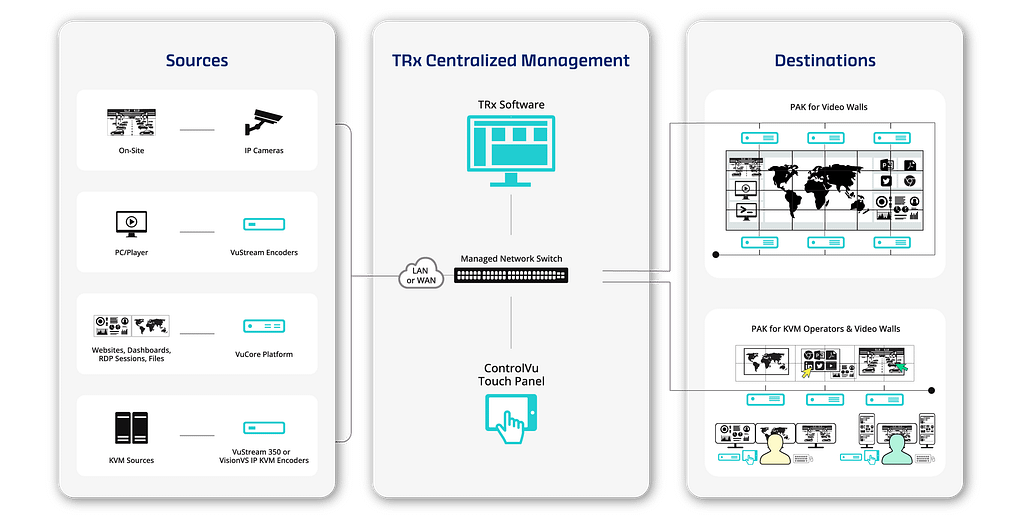
TRx est unique en ce sens qu'il combine la gestion avancée de murs vidéo multiples, les opérations KVM et la distribution AV en une seule plateforme. TRx permet de configurer, de gérer et de distribuer pratiquement n'importe quel type de source vers n'importe quel écran par un simple glisser-déposer et sans programmation.

Gestion centralisée
Configurez et contrôlez tous les murs vidéo, écrans et postes de travail KVM à partir d'une seule plateforme.

Sûr et fiable
S'exécute dans un environnement léger, conteneurisé et fermé pour des opérations stables et contrôlées.

Facilité d'utilisation
Interface facile à utiliser par glisser-déposer pour la configuration et les opérations.

Flexible et évolutif
Nombre illimité de sources et de destinations. Conception modulaire qui s'adapte aux besoins en constante évolution.

Interopérable
Prise en charge des principales plateformes AV et KVM, y compris G&D.

Disponibilité 24h/24 et 7j/7
Disponibilité totale et contrôle de votre infrastructure de visualisation.

Accès depuis n'importe où
Gestion basée sur le web.
Aucune installation logicielle requise.

Plugins VMS
Intégration avec Genetec Security Center et Milestone XProtect.
Flux de travail
Plateforme VuCore
VuCore est la plateforme sécurisée qui héberge et gère TRx, offrant une base centralisée pour l'écosystème de services de visualisation, de contrôle et opérationnels de VuWall. Elle simplifie le déploiement, renforce la fiabilité du système et prend en charge les flux de travail évolutifs AV, mur vidéo et KVM dans les environnements critiques.

Panneau de commande tactile
Donnez aux opérateurs la liberté de modifier les scenarios et contrôler les dispositifs d'une simple commande tactile. Créez des panneaux entièrement personnalisés rapidement et facilement sans aucune connaissance en programmation.
Technologie KVM IP
Partagez l'accès aux informations critiques entre les postes de travail personnels, les écrans locaux et le mur vidéo de la salle de contrôle principale. Augmentez votre productivité et prenez des décisions plus rapidement grâce aux capacités de PAK KVM.

Certification SOC 2
Nous ne faisons aucun compromis sur la sécurité, surtout lorsqu'il s'agit de salles de contrôle. La plateforme de gestion TRx est entièrement conforme à la norme SOC 2 Type II. Notre engagement envers des pratiques, des politiques, des procédures et des opérations de sécurité de l'information de premier ordre a fait l'objet d'un audit et d'une validation indépendants.
Sécurité
VuWall s'engage à maintenir le plus haut niveau de sécurité au noveau de l'entreprise, ses produits et ses services. Avec la certification SOC 2, la conformité TAA, la conformité NDAA, ISO 9001, les flux vidéo cryptés AES et la gestion des droits des utilisateurs, VuWall assure une tranquillité d'esprit.


Intégrations G&D KVM haute performance
TRx offre une prise en charge native des systèmes G&D, permettant un contrôle centralisé des sources et destinations KVM directement dans le flux de travail TRx. Grâce à l'intégration avec les matrices G&D ControlCenter et le PersonalWorkplace-Controller, TRx aide les opérateurs à gérer les ressources AV, les murs vidéo et KVM à partir d'une interface unifiée, simplifiant les opérations dans les environnements VuWall et G&D.
Secteurs qui dépendent de TRx

National/Défense
Intelligent et sûr

Transport
Gestion de contenu pour les transports modernes

Régional et local
Collaboration multi-sources pour les agences

Sécurité
Visualisation multi-sources et multi-écrans avec intégration VMS

Centres de données, IT et télécom
Visualisation multi-sources et collaboration

Services publics
Fiabilité 24/7 pour des opérations sûres et efficaces
Caractéristiques avancées de TRx
Interface de gestion basée sur le Web
Accédez à l'interface TRx depuis n'importe quel navigateur Web, aucun logiciel client requis. Simplification du déploiement, de la maintenance et de la gestion à distance.
Plugins VMS pour Genetec et Milestone
Intégration avec Genetec Security Center et Milestone XProtect via des plugins dédiés. Contrôle de TRx directement depuis les interfaces VMS avec importation automatique des caméras et hiérarchie système basée sur l'utilisateur.
Gestion des droits des utilisateurs
Contrôlez l'accès avec des autorisations basées sur les rôles et une intégration optionnelle d'Active Directory. Définissez les droits des utilisateurs pour les sources, les destinations, les préréglages, les panneaux de contrôle, le scripting et les fonctions système.
Interface de routage et de surveillance
Routage des sources vers des destinations avec des contrôles glisser-déposer, un filtrage avancé et des aperçus vidéo en temps réel pour un fonctionnement rapide et précis.
Gestion d'écran de mur vidéo et KVM
Gérez le contenu sur les murs vidéo et les postes de travail KVM via une interface intuitive. Positionnez, redimensionnez et mettez à l'échelle facilement les fenêtres sources pour des dispositions flexibles et une visualisation efficace.
Gestion des mises en page et des préréglages
Créez et enregistrez des agencements avec des positions sources et des arrangements d'affichage prédéfinis pour un déploiement rapide. Restaurez instantanément les configurations de mur vidéo, les agencements de postes de travail et les états de routage avec des préréglages.
Transformations de flux vidéo
Améliorez les flux vidéo avec le recadrage, le zoom, les superpositions de texte et les bordures personnalisables. Des modèles réutilisables et une gestion centralisée garantissent une configuration cohérente et un déploiement simplifié.
Manège (Tournée Source)
Défilez automatiquement entre plusieurs sources dans une fenêtre désignée pour maximiser la visibilité et l'efficacité d'affichage. Les durées de séjour et les listes de sources configurables permettent une rotation de contenu flexible et mains libres.
Workflow de configuration des actifs
Rationalisez le déploiement grâce à des outils de configuration par lots qui configurent plusieurs actifs simultanément. Les paramètres par défaut définis par l'utilisateur réduisent les tâches répétitives et accélèrent l'installation, l'expansion et la gestion.
Intégration KVM
Intégration avec des dispositifs KVM pour gérer le clavier, la vidéo, la souris et l'audio sur les systèmes connectés. La prise en charge du mode privé, du basculement USB et de l'accès aux PC en réseau permet un contrôle opérateur sécurisé et flexible.
Expérience utilisateur et contrôle KVM
Personnalisez les paramètres du curseur et les comportements d'inactivité tels que le flou de l'écran et la déconnexion automatique. Activez le contrôle unifié du clavier et de la souris sur tous les systèmes avec commutation dynamique des fenêtres et mise au point automatique.
Gestion de l'audio
Contrôle centralisé des entrées et sorties audio sur les encodeurs, décodeurs et flux réseau pris en charge, permettant un routage cohérent et une gestion audio simplifiée.
Automatisation et Script
Créez des macros et des flux d'automatisation pour rationaliser les opérations. Exécutez des séquences pour les dispositions, les déclencheurs et le contrôle des actifs, avec une intégration dans les panneaux tactiles ControlVu.
Appareils et protocoles pris en charge
Nœuds VuWall PAK, encodeurs VuStream, plateforme VuCore, commutateurs matriciels G&D ControlCenter, caméras IP, flux VNC, RTSP et MPEG-TS, intégration Genetec et Milestone
OpenAPI
La prise en charge des API REST permet l'intégration avec des systèmes externes et des plateformes de contrôle tierces. La documentation interactive et les exemples de code simplifient le développement et le déploiement.